
Open Reports for Dashboards, Reports, Revenue Report and Breakfast report. Use the Reports list for stored report definitions such as Production Orders, Sales Report and Sales and Commission Reconciliation when available to your account.
Choose a report, open its viewer, set the hotel and date/status parameters and submit them. Review the resulting headings and period before exporting. Reports show only data available to the account and report data source; a blank result can reflect parameters, permissions or missing eligible records.
Production Orders
Select a hotel and Order creation date (hotel time), optionally choose Status (blank = all), and choose Submit. The report contains one row per order with at least one product currently marked Requires Production, including free or meal-plan items. Unfinished and cancelled orders remain available for operational review.
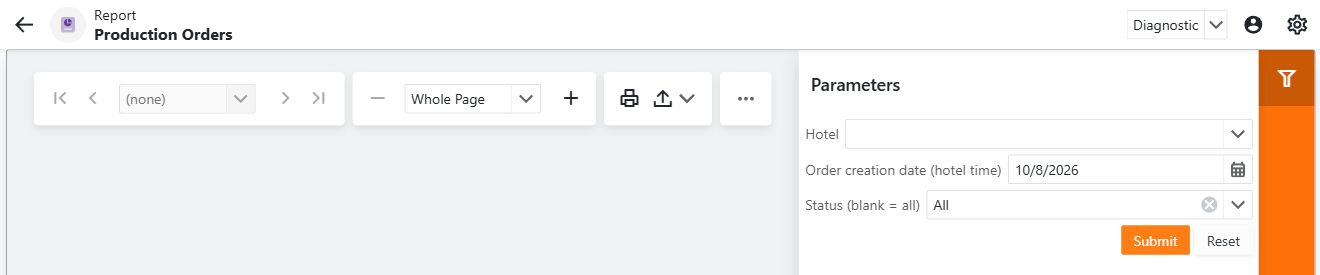
The date refers to creation, not finalization. An order finished after midnight stays under its creation day. Elapsed minutes measures creation to finalization including idle time; it is blank for unfinished or invalid timestamps. Created by identifies the recorded creator rather than the commission recipient.
Export to XLSX from the viewer when needed. Product eligibility reflects its current production setting, so changing that setting can affect a later report of historical orders.
Sales and commissions
Sales Report and Sales and Commission Reconciliation include finalized, nonzero eligible order items in the submitted hotel-local period. Cancelled items/orders and voided orders are excluded. Reconciliation commissions come from the commission ledger and exclude reversed entries.
Choose a hotel, or leave it empty to include the hotels accessible to the secured report source. Hotels are grouped separately even if their names match. User is the order creator, and the payment type is the saved Cash, Card or Room charge value. Room charge totals can include open orders; they do not establish that money has been collected.
Use payroll to review commission allocation and point of sale to inspect the underlying orders.
Missing or outdated output
Confirm parameters and the order's status/timestamps first. If a standard report is missing or its layout is outdated, contact the deployment administrator: report registration and layout refresh depend on the database update as well as the deployed application. Do not edit operational records merely to force a report row to appear.